Why Does Most Online Text Look So... Boring?
Most people are stuck with the same handful of system fonts. Profiles start to look identical. A font changer lets you step outside that default look without any design skills.
A few examples:
Gothic – 𝔊𝔬𝔱𝔥𝔦𝔠
Cursive – 𝒞𝓊𝓇𝓈𝒾𝓋ℯ
Bold Cursive – 𝓑𝓸𝓵𝓭 𝓒𝓾𝓻𝓼𝓲𝓿𝓮
Rounded – ᖇOᑌᑎᗪEᗪ
None of these are images or custom fonts you have to install. They’re Unicode characters, so you can copy them into an Instagram bio, TikTok username, Discord server, YouTube description, WhatsApp chat, X post, or most other places that accept text.
So Why Is Everyone Suddenly Into This?
Standing out online is harder than it used to be. Creators want captions that stop the scroll. Gamers want tags their friends remember. Small brands want names that stick. Plenty of people just want their text to feel a bit more personal. The goal is usually the same: look different without turning it into a big project.
That’s why FontChanger.cool keeps getting updates. New styles appear regularly, the mobile version stays quick, and there are more combinations to try.
- ✅ Live preview — styles update as you type.
- ✅ Sorted categories so you don’t have to scroll forever.
- ✅ One-click copy that gives clean, paste-ready text.
- ✅ Works with Instagram, TikTok, Discord, and most other platforms.
- ✅ Free — no accounts, no paywalls.
- ✅ Handles letters, numbers, symbols, and mixed styles.
What Kind of Styles Can You Find Here?
Everything is sorted into categories so you’re not stuck looking at a long wall of options. Jump to the style that fits what you need.
Categories include Stylish, Simple, Cool, Modern, Signature, Underline, Symbol Wrappers, Crown Accents, Intersect Accents, Loopy Symbols, Framed Text, Symbol Fusion, Flowing Frames, Ornamental Frames, Bold Borders, Whimsical Frames, Artistic, Emoji, Kawaii Face, and Random.
Some stay clean and understated. Others add crowns, borders, and extra symbols. The emoji and kawaii sets are playful if that’s your thing. The random generator is useful when you just want something unexpected.
Stylish and Artistic Fonts
These make text look deliberate. Flowing cursive for something elegant, heavy gothic for something stronger, or more abstract styles when you want to experiment.
Cool and Playful Styles
Bubble letters, flipped text, upside-down words, emoji mixes — this section is the most fun. Gamers use them a lot, TikTok creators do too, and they’re fine for casual chats as well.
Decorative Frames and Accents
Sometimes plain text isn’t enough and you want a frame, a crown, or symbols around the edges. These work well for announcements, quotes, headers, or anything that needs to catch the eye.
How Does It Work? (It's Embarrassingly Easy)
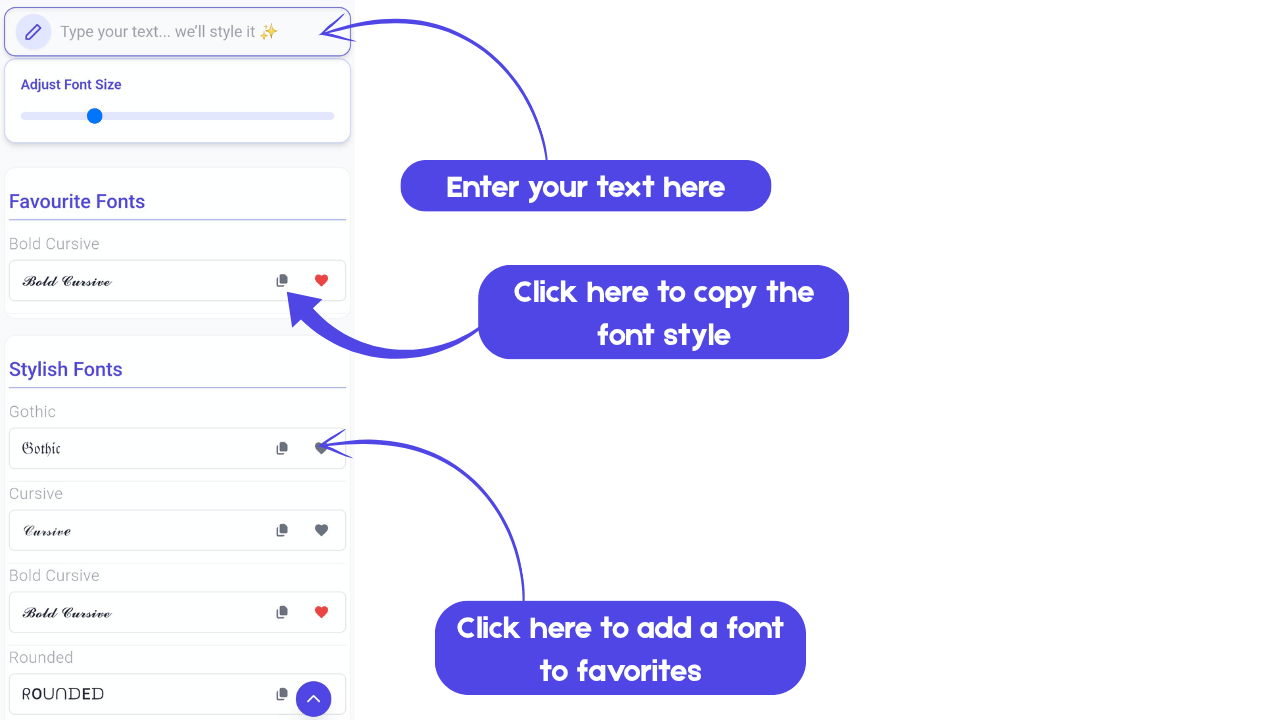
- Type something — or paste text you already have — into the box at the top.
- Scroll through the styles — they update live, so you see the result right away.
- Hit copy on the one you want.
- Paste it into a bio, comment, username field, group chat, or anywhere else.
That’s the whole process. If you can type and paste, you’re set.
Where Can You Actually Use This Stuff?
- Instagram: Bios, stories, and captions that stand out a bit more.
- TikTok: Usernames and descriptions that don’t blend into the default text.
- Discord: Server names, roles, and tags that people notice.
- YouTube: Channel descriptions and comments that feel less generic.
- Facebook, X (Twitter), and LinkedIn: Posts and profiles that catch the eye in a feed.
- WhatsApp, Telegram & Other Messengers: A bit of personality in everyday chats.
A Few Things Worth Knowing
- Fancy styles work best on short text — names, titles, one-liners. Long paragraphs get harder to read.
- For usernames, test on the platform first. Some apps are stricter about allowed characters.
- Sticking to one style across a profile usually looks cleaner than mixing several.
- Frames and symbols can be layered on styled text when you want extra emphasis.
- Simpler styles are better when readability matters more than decoration.
People Are Using This in Ways We Didn't Expect
Beyond social media, people find other uses. Students style study notes to make them less dull. Creators keep consistent font styles across platforms. Small businesses drop unique characters into product listings and email signatures. Some just send odd-looking messages in group chats for fun. All of those work.
Why Unicode Styles Just Work
Unicode text needs no installation. No plugins, no apps, no extensions. You copy it, paste it, and it looks the same on an iPhone, Android, Windows laptop, or Chromebook. It’s light, widely supported, and doesn’t slow anything down. In a feed full of similar-looking text, a different style can still make a difference.
Go Ahead — Make Your Text Yours
If default text feels flat, try something else. Browse the categories, mix styles, and pick whatever fits — clean and minimal or more decorative.
Everything updates live, copying is one click, and the list of styles keeps expanding. It’s a quick way to change how your text looks. Have a look.